AI search with sources
Ask your wiki a question in plain language. The answer is written only from your own pages and names the page and section it came from; if nothing fits, it says so instead of guessing.
How it works →Managed BookStack hosting · Hosted in the EU
A private BookStack wiki for your team, ready in about 5 minutes. We run the server, apply the updates and keep daily backups with restore help. One flat price: €39/month plus VAT.
AI included: search with sources, MCP access for your AI agents and drafts you approve. See the AI features
By continuing, you agree to the Terms and Data Processing Agreement.
Read-only demo workspace (demo.bookhost.co)
14 days free · No card required · Cancel monthly
Already running BookStack yourself? See what moving an existing instance involves
No card needed. Next you fill in a short Stripe form (name and billing address), then choose your workspace address; your BookStack is usually ready within 5 minutes and has its own login. The Stripe page is titled 'Amazing AI Apps' — that is the Stripe account name of our operator, productivity-boost.com Betriebs UG.
EU hosting
Hetzner infrastructure in Germany or Finland
Daily backups
Seven-day retention and restore help
Updates handled
Hosting, maintenance and security updates
Your own domain
Or a free bookhost.co address
AI in every workspace · included
Included in the €39 plan, for every workspace. AI processing runs on TensorX in Ireland with zero retained prompts; BookStack permissions and human review stay in charge.
Ask your wiki a question in plain language. The answer is written only from your own pages and names the page and section it came from; if nothing fits, it says so instead of guessing.
How it works →Every workspace has its own MCP endpoint for Claude Code, Cursor, VS Code, Codex and Claude Desktop. Each agent is its own BookStack user, so your roles decide what it sees.
How it works →Upload a PDF, DOCX, Markdown or TXT file and get a page draft with summary, tags and a reviewer checklist. Nothing is published until an owner or admin approves it.
How it works →Why teams pick BookHost
Keep your team's knowledge in BookStack's books, chapters and pages while we handle hosting, maintenance and security updates. Your private instance gives a small IT team or agency a shared place for procedures, handovers and client documentation.
Your instance is backed up daily, with restore help through support. Backups older than seven days are removed at the next daily retention run; with scheduled runs, this can add up to 24 hours. Export your content from BookStack whenever you need it, subject to your team's permissions.
Document intake with AI drafts is available now. Upload a document, check its suggested summary, tags and reviewer checklist, then have a team owner or admin approve the page for BookStack. 20 drafts during the trial; 300 drafts per calendar month (UTC) on Team, shared by the workspace. Processing reserves a place; failed draft generation returns it to its original period. Unused places do not roll over. Rejected drafts and failed publication still count.
From scattered to shared
No card is needed. Your workspace is ready in about 5 minutes, and BookStack has its own login.
Start a workspace with a 14-day free trial, then upload a PDF, DOCX, Markdown or TXT file and choose a destination book. The AI writes a draft page for you.
Review the proposed page, summary, tags and reviewer checklist alongside the source preview (first 2,000 characters). Keep your original document for the full comparison. Edit mistakes and resolve open questions before publishing. AI suggestions need human review.
A team owner or admin approves the draft to create a page in BookStack. The destination book determines who can read it. 20 drafts during the trial; 300 drafts per calendar month (UTC) on Team, shared by the workspace. Processing reserves a place; failed draft generation returns it to its original period. Unused places do not roll over. Rejected drafts and failed publication still count.
AI drafts with approval · available now
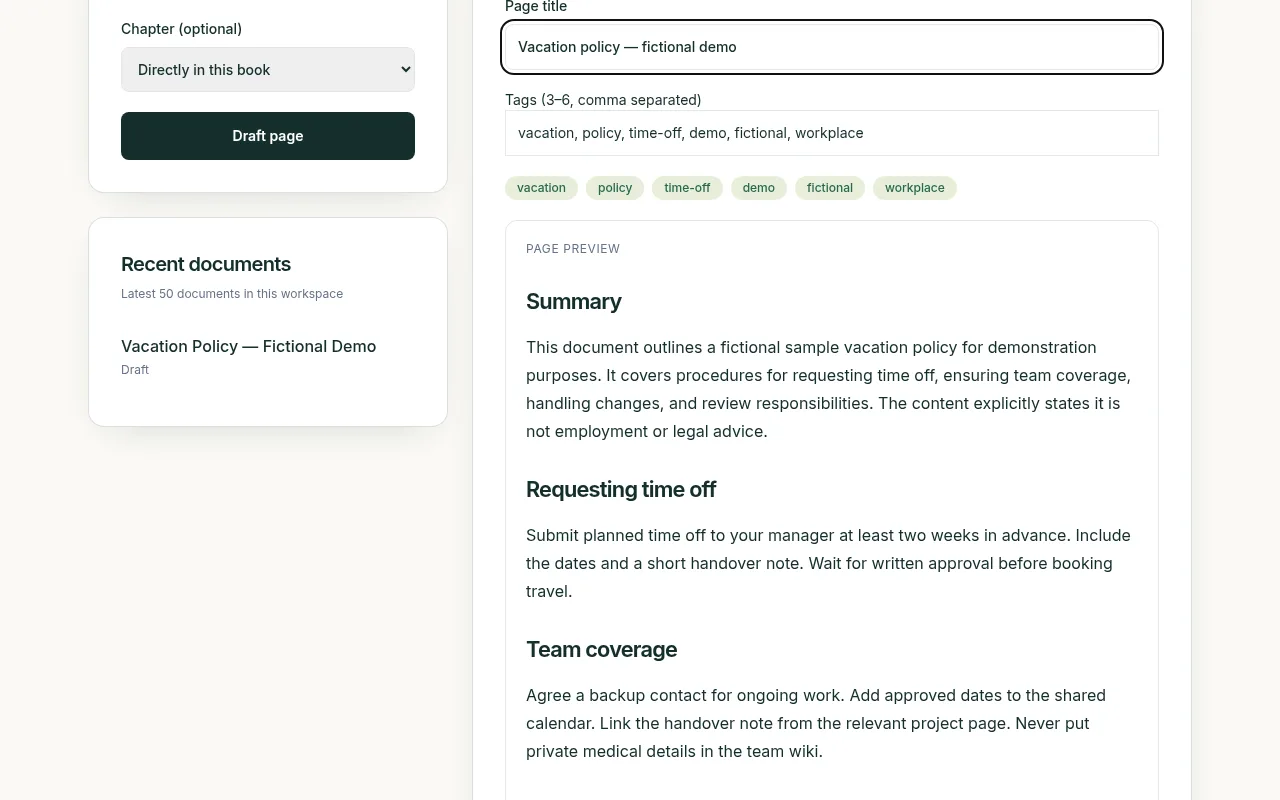
A real upload, AI draft and published page from our demo workspace. This vacation policy is fictional sample content.
Document intake is available now. Upload a document, review the draft with its summary, tags and reviewer checklist, then approve it as an owner or admin for BookStack. 20 drafts during the trial; 300 drafts per calendar month (UTC) on Team, shared by the workspace. Processing reserves a place; failed draft generation returns it to its original period. Unused places do not roll over. Rejected drafts and failed publication still count.
Processing conditions documented and released: uploads go to TensorX in Ireland under its data processing agreement — processing in Dublin and Helsinki, zero retained prompts and completions; the release for personal content is recorded in our DPA annex 3, and you stay the controller for what your workspace holds. See what we do and do not promise.
Only workspace owners/admins can publish; members can upload and review. Drafts are shared with your BookHost dashboard team; BookStack page permissions apply after publication.
Choose a document and a destination book. PDF, DOCX, Markdown and TXT are supported.
Check the summary, tags and reviewer checklist. Edit the draft before an owner or admin approves it.
Approval creates a normal BookStack page, visible according to its destination book’s permissions.
AI search with sources · available now
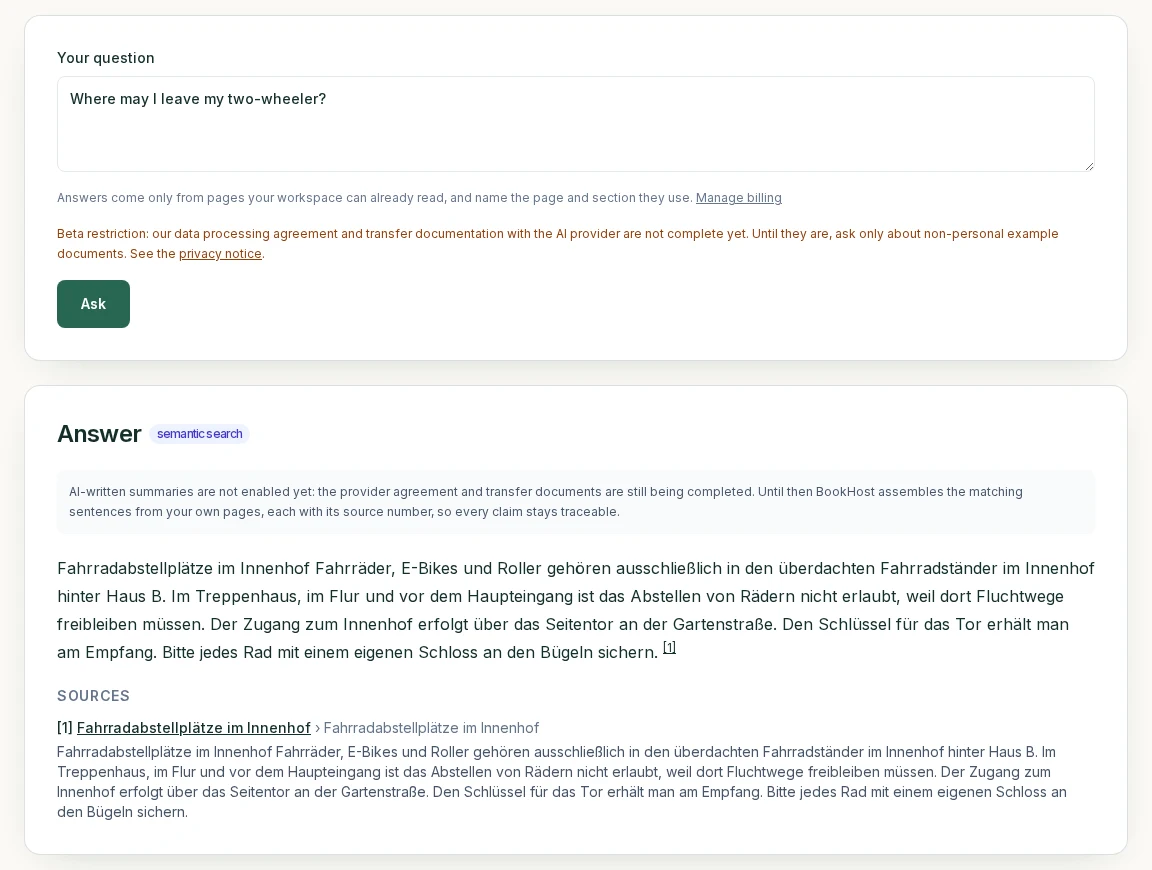
“Ask your wiki” is available now to workspace owners and admins: it searches your own workspace, answers only from the pages it found, and shows the page and section behind every result. Each question and the passages it answers from go to TensorX (Ireland) for a written answer — under the same documented conditions as for intake (processing in Dublin and Helsinki, zero retained prompts and completions); TensorX use for personal content is covered by annex 3 of our DPA, and you stay the controller for what your workspace holds. Answers scoped to each member’s own BookStack permissions are planned with no committed release date.
Animated demo: a question about bike parking, an answer with a numbered source, and the source page name.
Animation of a real answer from our internal test workspace — fictional sample content. Customer workspaces match by words unless an owner or admin turns on matching by meaning (beta); every answer still names its source page.
Agent access · MCP · available now
Connect Claude Code, Cursor, VS Code or Codex over MCP. Agents use their own BookStack user and permissions; their edits wait for your approval unless you allow direct edits.
How to connect an agent →Live collaborative editing · beta
Live Edit is an add-on editor overlay for BookStack. A workspace owner or admin can turn it on in the BookHost dashboard; then open a page’s Live Edit view to see other editors’ cursors and changes as they type.
Self-hosted or hosted
Self-hosting BookStack is a good choice if someone on your team enjoys running servers. If nobody does, this is the work you hand over.
Read the full self-hosted vs managed comparison →| Task | Self-hosted | BookHost |
|---|---|---|
| Server and TLS certificates | You set up and monitor them | Included |
| BookStack and security updates | You schedule and apply them | Included |
| Daily backups | You script and store them | Included, seven-day retention |
| Restoring a backup | You test and run restores yourself | Restore help through support |
| Your own domain | You configure DNS and certificates | Add it in the dashboard |
| Price | Server cost plus your time | €39/month plus VAT, one flat price |
One team. One simple plan.
Spend time sharing what you know. Let us take care of the infrastructure.
Try your own workspace for 14 days. No card needed. Your trial starts when you sign up through the Stripe registration, enter the billing address and choose your workspace address; your workspace is usually ready within 5 minutes.
€39/ month plus VAT
By continuing, you agree to the Terms and Data Processing Agreement.
No card needed. Next you fill in a short Stripe form (name and billing address), then choose your workspace address; your BookStack is usually ready within 5 minutes and has its own login. The Stripe page is titled 'Amazing AI Apps' — that is the Stripe account name of our operator, productivity-boost.com Betriebs UG.
Everything included
AI included · processed by TensorX in Ireland
Agent access · MCP
Only workspace owners/admins can publish; members can upload and review. Drafts are shared with your BookHost dashboard team; BookStack page permissions apply after publication.
AI is included in the plan at no extra cost. Beta: matching by meaning (one-click opt-in) and Live Edit. Planned: email intake, answers scoped to each member’s own BookStack permissions and OAuth for web connectors. Planned items are not available today; there is no committed release date. All AI features
No credit card · Cancel anytime · Plus applicable VAT
Add a payment method in Manage billing to continue after the trial. Without one, your trial ends automatically without a charge. €39/month + 19 % VAT (€46.41). EU businesses with a valid VAT ID outside Germany: contact us and we apply reverse charge manually. No setup fee for the standard plan. By continuing, you agree to the Terms and Data Processing Agreement, and acknowledge our Privacy Policy. For business teams.
Yes. Up to 25 BookHost dashboard members per workspace, including the owner. Native or imported BookStack accounts are not counted by this limit. 5 GB of uploads included (1 GB = 1 billion bytes). Upload directories are measured periodically; the dashboard warns from 80% by default. Uploads are not automatically blocked at this allowance. Contact support for higher storage needs; no automatic storage emails. Fair use applies to CPU and database resources. Contact info@productivity-boost.com for more resources.
BookStack is free, open-source software for organising documentation into books, chapters and pages. BookHost hosts it for teams that want a shared knowledge base without managing the underlying server, including existing self-hosters, small IT departments and agencies. BookHost is an independent hosting service, not an official BookStack product.
Our core hosting and backups use Hetzner infrastructure in Germany or Finland, within the EU. This does not mean every service processes data only in the EU: Stripe payments and optional Google sign-in can involve international processing. The AI features use our EU AI provider TensorX (Ireland): document intake sends the text of each uploaded document when your team requests a draft, AI search sends a question and the passages it answers from, and matching by meaning (opt-in) sends page text to build the search index, under the processing terms described in our German privacy notice and data processing agreement; TensorX's documented GPU infrastructure is in Dublin and Helsinki.
We make daily backups. Backups older than seven days are removed at the next daily retention run; with scheduled runs, this can add up to 24 hours. Contact support to agree which available backup to restore and what that means for changes made since that backup. A daily backup is not continuous recovery, and we do not promise a fixed restore time. BookStack content exports are also available during your subscription; they are useful for portability but are not necessarily a complete backup of users, settings and every system component.
Cancel through the customer portal, the public cancellation form at /cancel, or email support at any time for the end of your current monthly billing period. You retain normal access until that date, so export any content you want to keep before then. We delete active instance data within 30 days after the contract ends; protected backup copies expire within a further seven days. Earlier deletion can be requested, and statutory retention for invoices does not mean we keep your entire wiki. Consumer cancellation and withdrawal rights remain available as described in the terms.
Yes. Every workspace gets a bookhost.co address, and owners can add their own domain in the dashboard: enter it, add the shown DNS records, and we serve the workspace on both addresses. The bookhost.co address keeps working.
Contact us before switching anything off. We will assess your version, data size, attachments, authentication and custom changes, then agree the scope, any separate cost and the cutover approach before work starts. Migration is not advertised as an automatic one-click import or as included for every existing setup. Keep your current instance and backup until the migrated content and permissions have been checked. The full procedure, the two files we need and what we do not migrate are on our migration page: https://bookhost.co/migrate
Document intake is available now. Upload a PDF, DOCX, Markdown or TXT file to get a draft with a summary, tags and a reviewer checklist. Check and edit the suggestion; only a team owner or admin can approve publication to BookStack. 20 drafts during the trial; 300 drafts per calendar month (UTC) on Team, shared by the workspace. Processing reserves a place; failed draft generation returns it to its original period. Unused places do not roll over. Rejected drafts and failed publication still count. Files can be up to 10 MB and 60,000 extracted characters; scanned PDFs need OCR first. AI output can contain mistakes.
Intake is a shared inbox for your BookHost dashboard team: all team members can see its drafts and available destinations. It does not mirror each person's BookStack permissions. Only workspace owners/admins can publish; members can upload and review. BookStack page permissions apply after publication. AI search ("Ask your wiki") is available now to workspace owners and admins: it finds the matching pages, writes its answer with AI and names the source page and section behind every answer. Email intake, answers scoped to each member's own BookStack permissions and OAuth sign-in for web connectors are planned and are not available today. Matching by meaning and Live Edit are in beta. There is no committed release date for the planned parts.
Yes. Every workspace has an MCP endpoint that Claude Code, Cursor, VS Code and the Codex CLI can connect to; Claude Desktop works through the mcp-remote bridge. Owners and admins create an agent user with a BookStack role in the dashboard, so BookStack permissions decide what the agent can read and change. By default, agent edits wait in the review queue for an owner or admin; direct edits can be allowed per workspace. BookHost does not send page content to an AI model for this feature; it goes only to the agent you connect. Claude.ai web connectors and ChatGPT connectors need OAuth sign-in, which is planned and not available yet. Setup: https://bookhost.co/agents
Yes. AI search with sources, MCP agent access and AI drafts are included in the €39/month plan for every workspace, within the monthly allowances shown on the pricing page. There is no separate AI add-on. Details, limits and data handling: https://bookhost.co/ai
No card is required for the 14-day trial. Your trial starts when you sign up; your workspace is usually ready within 5 minutes. Add a payment method through Manage billing if you want to continue at €39/month plus applicable VAT after the trial. Without a payment method, the subscription ends automatically without a charge. Export anything you want to keep before the trial ends.
Email support covers the hosted service, access problems and requests to restore an available backup. Contact info@productivity-boost.com with your instance address and a description of the issue; do not send passwords or private keys. There is no advertised 24/7 response commitment or fixed response-time SLA. Migration, custom integrations and additional work are assessed and agreed separately.
Your own BookStack in about 5 minutes. 14 days free, no card required.